Something that's come up in our class is how to best get Flickr photos onto a blog. We went over it a bit in class, but I'm going to put instructions on here.
The easiest way is if you have a Flickr Pro account and you're working with your own photos or the photos of someone who has given others permission to use their photos through a
Creative Commons license.
At the top of every photo, if you have a Flickr Pro account, there is a menu that includes "all sizes."

Click on "all sizes" and choose the size you want to include on your blog (probably small or medium, depending on your blog and the photo).
If the photo belongs to you or has been licensed for sharing, scroll down and you'll see something like this:
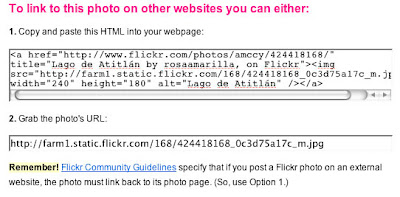
Assuming you want to link back to Flickr, copy the HTML from the top window into your blog post window. Note that if you're in "Compose" mode in Blogger, you
don't have to go into "Edit HTML." I copied and pasted it in, and voila:

But! What if your situation is not so straightforward? What if you wanted to, er, borrow photos without permission? (Because clearly that person didn't know how to put a Creative Commons license on their photos, right?) Or, what if they are sharing their work, but you don't have a Pro account? Or what if you're using a photo that's not on Flickr?
What you do is find your photo of choice in your size of choice (if applicable), then control-click (Mac) or right-click (PC) and choose "Copy Image Location" (or the equivalent). Then use this HTML code:
<img src="http://imageurl.jpg">
But, what if you want that photo to link back to the page you got it from (or some other web page)? Go copy the URL for your desired page and use this code:
<a href="http://webpage.com"><img src="http://imageurl.jpg"></a>
But but, what if you want it centered? Do this:
<center><a href="http://webpage.com"><img src="http://imageurl.jpg"></a></center>
You can put those <center> </center> tags around your code copied and pasted from Flickr as well.
What if you want to insert your photo via the Blogger add image tool (if you have the image on your hard drive), and you want to add a link (to Flickr or wherever)? Click on this icon:

Browse to find the photo on your computer, choose your preferred size and alignment, and click to upload. It will put the image at the top of your blog post. Super annoying. You can click on the image to select it, then cut (Mac: command-X; PC: ctrl-X) and paste it in your desired location.
To make that photo into a link, find your desired URL, select the photo (still within your Compose window), and click the Link icon:

Paste your URL in there, and it will link-ify your image (you can check in Preview to make sure it worked). You can also go into Edit HTML and work from there, but if you're not familiar with HTML it's a little scary looking.
If you have any questions or problems, please feel free to ask in the comments, and I'll do my best to answer.
Update: I realized that even if another Flickr user is allowing their photos to be used by others, the HTML code to copy and paste isn't there unless they're your own photos. So if you want to use someone else's photos, use the code I provided with the photo URL and page URL.


 Click on "all sizes" and choose the size you want to include on your blog (probably small or medium, depending on your blog and the photo).
 Assuming you want to link back to Flickr, copy the HTML from the top window into your blog post window. Note that if you're in "Compose" mode in Blogger, you don't have to go into "Edit HTML." I copied and pasted it in, and voila: